
Josel Christian S. Ferrer – Blog layout and maintenance, hardware and equipment costs.
Cherry Mae R. Robles – Project Overview Statement, Floor Plan
Jeffrey B. Saguinsin – Network Installation Process, wiring standards
Richard Albert C. Salivio – Network Installation Process, Floor plan
Saturday, March 7, 2009
Project Overview
Overview
IT 2 is a laboratory room consisting of many PCs, with an appropriate network connection the room will be much more efficient to use. In this network we will be using server based network environments that will manage and facilitate the whole network. This network will implement the star topology for easier expansion of workstations and for easier troubleshooting in case an error occurs.
Objectives
1. To create a network design for the room IT2 that will provide students and instructors with a network connection for easier file sharing for each computer in the class room.
2. To help Instructors with easier and well organized way of checking files due to the help of the network connection
Hardware Requirements
1 Router
24 workstations
2 Hubs
Category 5 Unshielded Twisted Pair Cable
RJ45

Network Installation
Our group discussed about the topologies that we will use, we have come to the decision to use the star topology to implement in the room IT2.

Advantages of a Star Topology
- Easy to install and wire.
- No disruptions to the network then connecting or removing devices.
- Easy to detect faults and to remove parts.
Disadvantage of a Star Topology
- Requires more cable length than a linear topology.
- If the hub or concentrator fails, nodes attached are disabled.
- More expensive than linear bus topologies because of the cost of the concentrators
The protocols used with star configurations are usually Ethernet.
Friday, March 6, 2009
Hardware and Pricing
LAN CARD
D-Link DFE-530TX 10/100
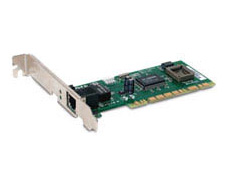
Product Features:

Technical Specifications:
Routing Protocols
Price:P2,200/box
RJ 45

D-Link DFE-530TX 10/100
Product Features:
| • | Connect to a Network and Surf the Web with Your Desktop PC |
| • | Windows® Automatically Detects the Adapter for Easy Installation |
| • | Up and Running in Minutes Price: P630x24 = P15120
|
Switch
D-Link DES-1016 16 Port Switch
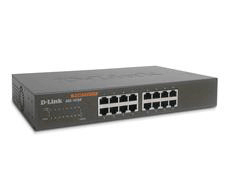
Superior Performance, Exceptional Value, Auto Sensing 10/100 ports
Product DescriptionThe DES-1016D is an unmanaged 10/100Mbps switch designed to enhance workgroup performance while providing a high level of flexibility. Powerful yet easy to use, this device allows users to simply plug any port to either a 10Mbps or 100
Mbps network to multiply bandwidths, boost response time and satisfy heavy load demands.
16 Auto-sensing 10/100Mbps Ports
The switch comes with 16 10/100Mbps ports, allowing a small workgroup to flexibly integrate to Ethernet and Fast Ethernet. These intelligent ports detect the network speed and auto-negotiate between 100BASE-TX and 10BASE-T, as well as between full and half-duplex.
Flow Control for Secure Transmission
All ports support flow control. This function minimizes dropped packets by sending out collision signals when the ports receiving buffer is full.
Auto-negotiation of MDI/MDIX Cross Over
All ports support auto-negotiation of MDI/MDIX cross over. This eliminates the need for cross over cables or uplink ports. Any port can simply plug to a server, a hub or a switch, using the usual straight-through twisted-pair cable.
Plug-and-Play
With 16 plug-and-play ports, the switch is a perfect choice for workgroups to upgrade performance in a client/server environment. The ports can be connected to servers in fullduplex, or hubs in half-duplex.
Direct Connection to Workstations
With low-cost connection per-port, the switch can be set up for direct connection from the PCs. This relieves data bottleneck by giving each workstation a dedicated bandwidth on the network.
ROUTER
Technical Specifications:
Routing Protocols
- Static and Dynamic Routing with TCP/IP, VPN pass-through (IPSec, L2TP, PPTP), NAT, UDP, RIP, PPPoE, PPPoA, Classical IP, DNS, DHCP (client & server)
Application Support
- Works with most Internet applications including: Quake®, Half-Life®, StarCraft, Unreal Tournament®, ICQ®, AOL® Instant Messenger™, Microsoft Messenger®, NetMeeting®, RealPlayer®, Windows Media Player™, Net2Phone®, Dialpad®
Physical Interfaces
- LAN Ports: Four 10/100 Mbps auto-sensing, Auto Uplink™ RJ-45 ports (one Cat 5 UTP cable included)
- WAN Port: ADSL RJ-11, T1.413, G.DMT, G.Lite, ADSL2+, ITU Annex A; Annex B version is DG834B
Security Features
- Firewall: Stateful Packet Inspection, Intrusion logging and Reporting, Denial of Service protection
- VPN Functionality: NAT traversal (VPN pass-through) for IPSec, PPTP and L2TP VPNs, supports up to 5 IPsec end points
- Mode of Operation: Network Address Translation (NAT), static routing
- IP Address Assignment: Static IP address assignment, internal DHCP server on LAN, DHCP client on WAN
Management Features
- Administration Interface: web graphic user interface with protected user name and password, remotely accessible from designated IP addresses
User Support
- Up to 253 LAN users
RFC Support
- IPSec tunnel mode (RFC 2401) (pass through mode), IP v.4
- DHCP server (RFC 2131)
- DHCP client (RFC 2131)
- NAT (many-to-one) (RFC 1631)
- IP Control Protocol (RFC 1332)
- Bridged Ethernet (RFC 1483, 2684)
- Encapsulation PPP over Ethernet (PPPoE) (RFC 2516)
- PPP over ATM (PPPoA) (RFC 2364)
- Classical IP over ATM (RFC 1577)
ADSL Specifications
- AD SL, ADSL2+, ANSI T1.413, G.DMT, G.Lite (ITU Annex A; Annex B version is DG834B)
Functions
- Remote Management, Port Range Forwarding, Exposed Host (DMZ), DNS Proxy, URL Content Filtering, E-mail AlertsMaintenance Save/Restore Configuration, Diagnostics, Upgrades via Web Browser, Logging
Power Adapter
- 12 VDC, 1A; plug is localized to country of sale
Physical Specifications
- Dimensions (h x w x d): 175.3 x 27.94 x 119.4 mm (6.9 x 1.1 x 4.7 in.)
- Weight: 0.3 kg (0.7 lb)
Environmental Specifications
- Operating temperature: 0 to 40º C (32 to 104º F)
- Operating humidity: 90% maximum relative humidity, noncondensing
Warranty
- NETGEAR 2-year warranty
Package Contents
- ADSL2+ Modem Router (DG834)
- Power adapter
- Vertical stand
- Ethernet cable
- Phone cable
- ADSL phone line filter (most countries)
- Setup CD
- Warranty/Support information card
*Free basic installation support provided for 90 days from date of purchase. Advanced product features and configurations are not included in free basic installation support; optional premium support available.
**Actual performance may vary due to operating conditions
Price: P3,695
Cable
UTP cable
Category 5
Price:P2,200/box
RJ 45
Price: P5 x 50pcs = P250
Subscribe to:
Posts (Atom)